Just saw a post on Paul Irish’s Blog explaining the “protocol relative URL”, which appears to be a great way to eliminate this confusing (or possibly even scary for some) error message in IE: “This Page Contains Both Secure and Non-Secure Items”.
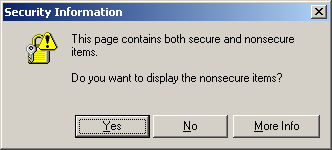
The code is a relatively simple change and there are very few caveats, so this seems like a fix that could significantly increase user confidence when browsing in environments that move from HTTP to HTTPS .
HTTPS Goes Mainstream
HTTPS usage has recently moved beyond the e-commerce and banking/financial sectors:
- In January of 2011 Facebook announced that HTTPS access was available everywhere, not just for log-in.
- And earlier today, Twitter introduced a setting that allows the user to always connect to twitter.com via HTTPS.
Given the ridiculously heavy traffic on those two sites, it’s pretty obvious that the issue of moving back and forth between secure and unsecured websites, and even between secured/non-secured sections of the same website, will be a much more common activity.
And although IE has been losing market share of late, it is still too much of a force to be ignored. Today’s release of the (allegedly) HTML5 friendly IE9 today at SXSW seems to indicate IE isn’t going away anytime soon.
Big Return on User Experience (and Investment)
I plan on investigating this seemingly simple fix, as the words NON-SECURE ITEMS create uncertainty, and are likely to give pause to many users.
The results of that “pause” or “uncertainty” ranges from simply slowing the user down and “making them think”, to eroding trust in your brand, to the worst-case-scenario of causing a previously happy consumer to abandon his or her shopping cart due to security concerns. And no one wants that to happen.
Links:
- The Protocol-Relative URL, 10/27/2010, by Paul Irish.
- Facebook Finally Adds HTTPS Support, 01/27/2011 , by Stan Schroeder
- Making Twitter More Secure: HTTPS , 03/15/2011, by Twitter Blog Staff.
- Internet Explorer 9 Info & Download